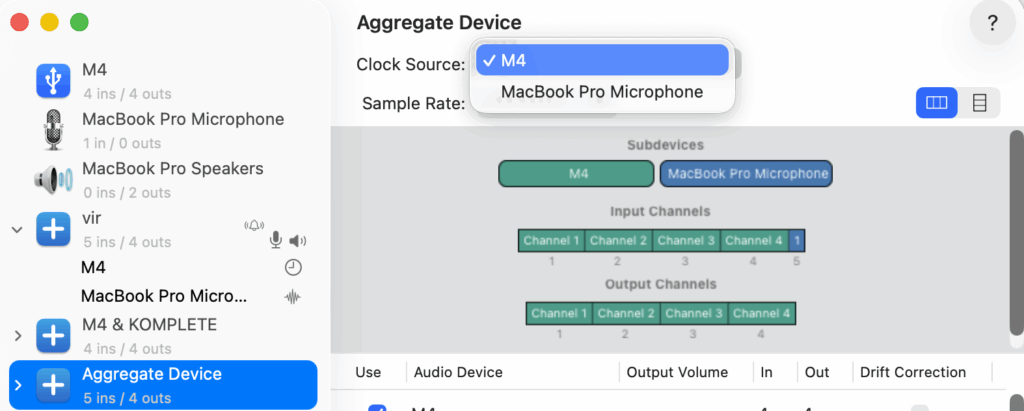
Digital “clicks,” “pops,” or “blips” during recording—particularly after a macOS update—are typically caused by synchronization failures within an Aggregate Device. When multiple hardware components (e.g., a Motu M4 and a MacBook Internal Microphone) are combined, their digital clocks must be perfectly aligned to prevent sample-rate drifting.
macOS Updates can be like a reset button for your Mac’s Core Audio drivers. This process can break the “digital handshake” between your external interface and the Mac’s internal microphone within your aggregate device, essentially “bumping” the pro audio interface out of its role as the master clock. Your Mac might reset to prioritize internal devices, causing that crucial clock synchronization to get lost in the shuffle.
The solution on this problem is to force the system to perform a new fresh handshake within Audio MIDI Setup. Begin by identifying the “Master” device; set the Clock Source to your most stable hardware, such as the Motu M4, to act as the primary timing reference. Next, perform a “Force Sync” by toggling the Clock Source to the “MacBook Pro Microphone,” waiting five seconds, and then switching it back to the primary interface.